Showing posts with label failed. Show all posts
Showing posts with label failed. Show all posts
Thursday, July 25, 2013

Tuesday, July 16, 2013
System State Backup Failed on Windows 2008 R2 SP1 with Windows Backup
Dear All,
I am running Windows Server 2008 R2 SP1 Domain Controller and have a scheduled job to backup only the System State data to a volume (D drive) on the server itself.
Periodically and randomly the job fails with a status message in the Windows backup console saying "Failed. The operation was stopped. Detailed error: Access is denied"
In the event log I see the following
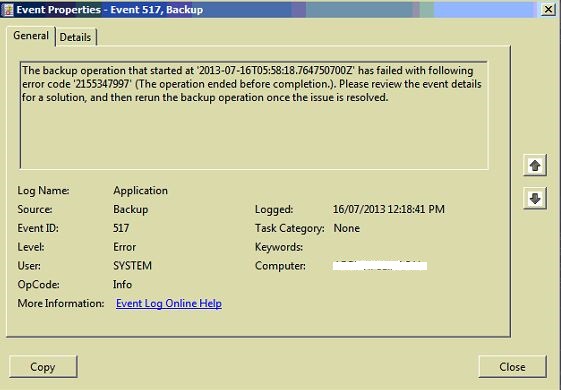
I checked online for the above error code and found MS Hotfix 2182466 but when I try to install it, it says "The update is not applicable to your computer" (I have verified the hotfix is the correct one for the server I am running).
Resolution :
After searching a lot on internet and suddenly I found solution.
TrendMicro Antivirus Software is installed on server so that I have disabled it and bOOOOOMMMMM!!!!!!!! windows system state backup has completed without any error...
I am running Windows Server 2008 R2 SP1 Domain Controller and have a scheduled job to backup only the System State data to a volume (D drive) on the server itself.
Periodically and randomly the job fails with a status message in the Windows backup console saying "Failed. The operation was stopped. Detailed error: Access is denied"
In the event log I see the following
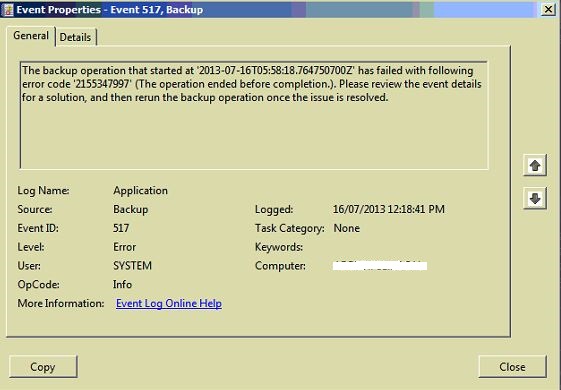
I checked online for the above error code and found MS Hotfix 2182466 but when I try to install it, it says "The update is not applicable to your computer" (I have verified the hotfix is the correct one for the server I am running).
Resolution :
After searching a lot on internet and suddenly I found solution.
TrendMicro Antivirus Software is installed on server so that I have disabled it and bOOOOOMMMMM!!!!!!!! windows system state backup has completed without any error...
Friday, January 18, 2013
MP Control Failed To Start
Error :
SMS_MP_CONTROL_MANAGER failed to start with 0x8004100e SMS_MP_CONTROL_MANAGER in MPCONTROL.LOG
Cause :
0x8004100e = WBEM_E_INVALID_NAMESPACE
Resolution :
To resolve above problem needs to check WMI Permissions or follow below steps.
1) Reboot Site Server. ( also Reboot Database server if installed separately. ) OR
2) Uninstall SCCM Client from Site Server. OR
3) Open Command Prompt on Site server and type winmgmt /salvagerepository command to refresh WMI Permission. OR
4) Reset Site System will reinstall Management Point.
Wednesday, June 20, 2012
ERROR : reporting services catalog database file existence while installing SQL server 2008 R2
SQL Server 2008 R2 Setup shows the following error messages after running a
set of rules to determine if the installation process wizard Pre-requisites check.
- "Reporting Services Catalog Database File Existence" failed
- "Reporting Services Catalog Temporary Database File Existence" failed.
CAUSE :
This issue occurs because the databases for the SQL Server 2008 Reporting Services instance that you want to install already exist on the computer with following path.
C:\Program Files\Microsoft SQL Server\MSSQL10.MSSQLSERVER\MSSQL\DATA
RESOLUTION :
Solution 1:
Use a different SQL instance name.
Solution 2:
Manually Remove .MDF and .LDF files from below path and Re-run Setup.
C:\Program Files\Microsoft SQL Server\MSSQL10.MSSQLSERVER\MSSQL\DATA
Cheers!!!
Gaurang Patel
Subscribe to:
Posts (Atom)